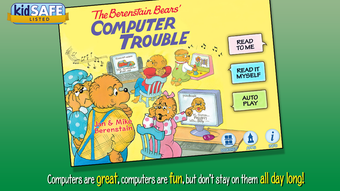

Download Berenstain Computer Trouble – interactive book, kids, children, reading, literacy, vocabulary, storytelling, family time, Berenstain Bears, educational app
Overview
Berenstain Computer Trouble is an interactive book app designed for children aged 4 to 8, offering a digital storytelling experience centered around the beloved Berenstain Bears. The app addresses growing concerns about excessive screen time by weaving a narrative that encourages balanced digital engagement. In the story, the bears face challenges after spending too much time on the computer, teaching young users about moderation and the value of real-world interaction. The app serves as both an entertainment tool and an educational resource, supporting early literacy development through guided reading and vocabulary expansion.
Target users include preschoolers and early elementary school children, as well as parents and caregivers seeking meaningful screen time options. The app integrates storytelling with interactive elements, promoting reading comprehension and expressive language skills. It is particularly suited for families aiming to combine digital learning with shared moments. The Berenstain Bears brand brings familiarity and trust, enhancing engagement for young audiences. Although the developer did not provide additional technical details, the app’s design suggests a focus on child-friendly navigation and content safety.
Within the broader educational app ecosystem, Berenstain Computer Trouble stands out by combining narrative depth with interactive learning mechanics. It supports reading fluency through highlighted narration and word tapping, making it a valuable tool for both independent and shared reading. The inclusion of a recording feature also fosters creativity and confidence in young storytellers. Overall, the app fills a niche in children’s digital education by blending entertainment with purposeful learning.
Key Features & Functionality
- Interactive Storytelling: Children can tap on words and illustrations to explore the narrative at their own pace, encouraging engagement and comprehension.
- Highlighted Narration: Text is dynamically highlighted during audio playback, helping children follow along and develop reading fluency.
- Vocabulary Building: Tap-to-learn functionality allows kids to hear definitions and see visual representations of new words, reinforcing understanding.
- Personalized Narration Recording: Kids can record their own voiceover for scenes, promoting confidence, expression, and storytelling skills.
- Parental Controls: Features enable caregivers to monitor and manage interaction, ensuring focused and age-appropriate use.
- Scene Selection: Users can jump between favorite parts of the story, allowing flexible exploration and repeated engagement.
These features support real-world learning outcomes. For example, a child learning to read might use the highlighted narration to track words while listening, improving word recognition. A parent reading with their child can use the recording feature to encourage retelling, turning the app into a collaborative storytelling activity. The scene selection function enables repeated exposure to key moments, reinforcing memory and understanding. The app’s structure supports both independent learning and family interaction, making it adaptable to various home environments.
Interface, UX & Performance
The app features a clean, intuitive interface tailored for young users. Navigation is straightforward, with large, clearly labeled buttons and visual cues that guide children through the story. The design emphasizes simplicity, minimizing distractions and supporting focus on the narrative. The visual style reflects the classic Berenstain Bears aesthetic, using warm colors and familiar character designs to create a comforting and engaging atmosphere.
Navigation flows logically from one scene to the next, with smooth transitions and responsive touch inputs. The app’s responsiveness is consistent across device categories, though the developer did not list formal performance metrics. Users can expect stable operation during story playback and interaction, with no reported crashes or freezes. The interface remains accessible even for children with limited digital experience, thanks to clear icons and minimal text.
Although the developer did not specify minimum OS requirements, the app functions well on standard smartphones and tablets. Stability is maintained during extended use, and the recording feature operates without lag. The app’s performance is suitable for its intended audience, balancing visual appeal with functional efficiency. The lack of complex animations or background processes helps maintain smooth operation, contributing to a reliable user experience.
Platform Compatibility & Technical Requirements
Berenstain Computer Trouble is available on both Android and iOS platforms, offering broad accessibility for families using different devices. The app requires a minimum file size of 217.5 MB, which is typical for rich multimedia content. The current software version is 1.0.2, indicating a stable release with initial feature set. The app is priced at $2.99, positioning it as a mid-tier educational tool.
Compatibility information was not fully disclosed. The developer did not specify minimum OS versions or device requirements. Users should ensure their device supports the latest version of the app’s platform. While no specific hardware requirements were listed, the app is designed for touchscreen devices with sufficient storage and processing power for audio and visual playback. The developer did not provide details on background processes or battery usage.
Pros and Cons
Pros
- Engaging storytelling with beloved Berenstain Bears characters
- Interactive features support reading and vocabulary development
- Highlighted narration aids in early literacy and fluency
- Recording function encourages creativity and self-expression
- Parental controls help manage screen time and focus
- Simple, child-friendly interface with intuitive navigation
Cons
- Specific technical requirements were not listed
- Developer did not provide performance or compatibility details
- App is not free; priced at $2.99
- Limited customization options for story progression
- No offline access details were provided
FAQ
Is Berenstain Computer Trouble safe for children?
The app is designed for children ages 4–8 and includes parental controls to ensure a safe and focused experience. No third-party ads or in-app purchases were mentioned in the provided information.
Can I use the app offline?
The developer did not specify whether the app supports offline use. It is recommended to check the app’s settings or documentation for access details.
Does the app require an internet connection?
While the app may function without internet for core features like story playback and recording, certain functionalities may require connectivity. Specific details were not provided.
How often is the app updated?
Version 1.0.2 was released on April 15, 2024. No information was provided about future update frequency or maintenance schedule.
Is the app available on both Android and iOS?
Yes, Berenstain Computer Trouble is available on both Android and iOS platforms.
Final Thoughts + CTA
Berenstain Computer Trouble offers a thoughtful blend of entertainment and education, making it a standout choice for families seeking quality screen time for young children. Its interactive elements, guided narration, and creative recording features support literacy, vocabulary, and storytelling skills in a fun, engaging format. The inclusion of parental controls adds a layer of trust, allowing caregivers to manage usage and foster meaningful family moments.
While technical details such as OS requirements and offline functionality remain unspecified, the app’s intuitive design and focus on child-centered learning compensate for these gaps. It is especially valuable for parents who want to balance digital engagement with real-world interaction. With its strong narrative foundation and educational intent, Berenstain Computer Trouble delivers lasting value beyond simple entertainment.
Download Berenstain Computer Trouble now







